How geo-grid rank tracking works, one pin at a time
The five steps at every pin, what “as a phone sees it” means, and the evidence with its limits.
Read the guide: How geo-grid rank tracking works, one pin at a time
Features
Every feature on every plan, with unlimited clients and team members. Credits cover Maps scans, AEO checks and the other tools that use them: work out how many you need.
1,000 free credits, no card · valid for 30 days
Every pin is a real Google Maps search, as a phone sees it. How a pin works · See a sample client report
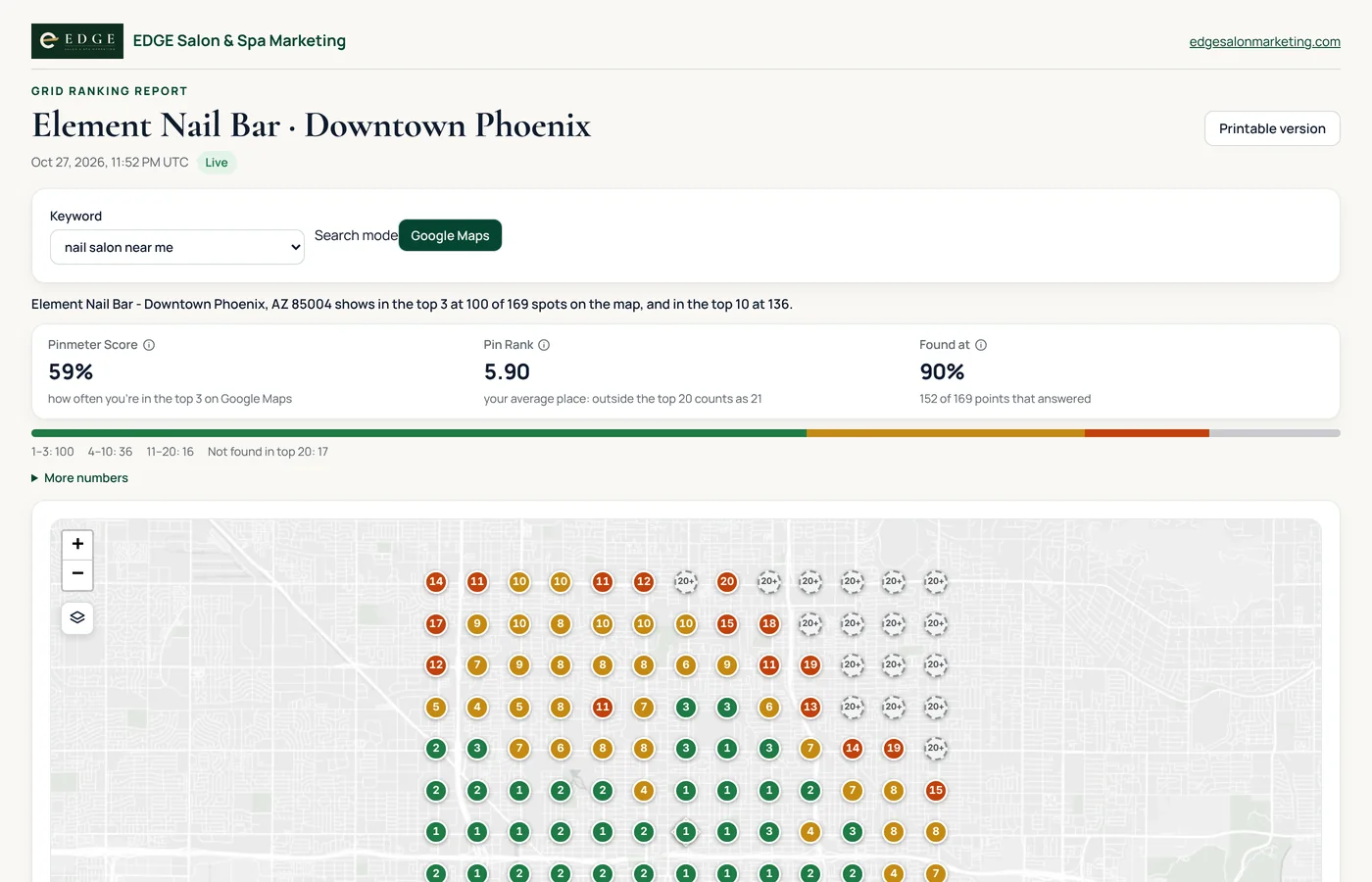 (opens the live demo report in a new tab)
More tools for your agency
Connect ChatGPT, Claude or another AI assistant that takes a custom connector, and ask about your clients in plain words: how a business did this week, who leads the top 3, which competitors it can overtake, what changed since the last scan. The answers come from the same scans as your reports. A key reads only your workspace, as the person who made it.
You get Answers about a client in the chat you already use, without opening a report.
Questions you can ask
What a key can do
| Key | What the assistant can do |
|---|---|
| Read (the default) | Your businesses, saved grids, scans, Pinmeter Score and Pin Rank, insights, competitors, what changed and progress over time. Uses no credits. |
| Read and run grids | All of that, and it can start a saved grid. Each run uses credits, like “Run now”. Needs a manager or owner. |
Example questions. The numbers come from your own scans; how the assistant words its answer is up to the assistant.
Pick a day of the month or a weekday and up to five of the client’s addresses, and their report goes out every month or every week in your agency’s name, with your contact details, a small “Powered by Local Pinmeter” line and a one-click stop link. Replies come to whoever set it up. Every client report also shows “What we did for you”: the Google posts and photos that went live, the review replies sent from the app and the scans run in the last 30 days.
You get A report that goes out on time, every month or every week, and a short list of the clients who need a call.
The Businesses page opens with what needs you: clients to check on before they notice a drop, a business nobody has scanned yet, businesses with no schedule, and plan credits that end soon. Each line has one button to act on it.
You get You hear about a slipping client before they call you.
1,000 free credits, no card · valid for 30 days
Questions
Yes. Every plan has every feature, with unlimited clients, keywords and team members; only the credits differ. See the plans.
Maps scans use 1 credit per pin for each keyword (a Live scan uses 2.5). AEO checks, reviews widgets, LeadPin free scans and AI reply drafts use credits too. Reports, write-ups and sending a report use none. The credit calculator adds it up.
Yes. The AEO report asks ChatGPT, Gemini and Google’s AI the questions customers ask, 5 per keyword, and counts which businesses they name and the websites they used. A count of what the AIs said, never a rank.
Yes. Give a client a read-only login under your brand, send the report as a link or PDF, or switch on the client report email.
Trust every pin.